SEONGSUMIL BAKERY
Salted Butter Roll
Crisp outside, tender inside
1 piece2,500KRW
Wheat Flour (USA / Canada), Unsalted Butter (New Zealand), Milk (South Korea)
 dibployOpen workspace
DIBPLOY FEATURES
Follow a fictional bakery making salted butter rolls. Start with product and packaging costs, then explore recipes, purchasing, price changes and workforce records.
Names, prices, recipes and filenames are fictional. These illustrations explain features and are separate from the actual workspace.
01 / Products & costs
Connect recipes and packaging, set quantities, then review material, packaging, labor and overhead costs alongside selling prices and margins.
Salted butter rolls · Product example
Bags: ₩9,000 / 100; boxes: ₩21,000 / 50; stickers: ₩5,000 / 500. Example material cost is rounded up per roll. Review labor, overhead and margin separately.
02 / Recipes
Build formulas from ingredients and intermediate recipes, and track revisions. Compare the base batch with the quantity you need to produce.
Salted butter rolls · Recipe v3 · Example
| Ingredient | 40 rolls | 80 rolls |
|---|---|---|
| Bread flour | 2,000 g | 4,000 g |
| Milk | 1,100 ml | 2,200 ml |
| Unsalted butter | 360 g | 720 g |
| Sugar | 160 g | 320 g |
| Sea salt | 40 g | 80 g |
| Instant yeast | 24 g | 48 g |
Milk is measured in ml; other ingredients in g. Finished weight and baking loss are excluded from this example.
03 / Ingredients
An ingredient name alone cannot tell you its cost. Keep suppliers, pack sizes and purchase prices together.
Seongsumil Bakery · Purchase examples
| Product / supplier | Pack | Price |
|---|---|---|
| Bread flourGaon Milling | 20 kg | ₩32,000 |
| MilkHangil Dairy | 1 L | ₩2,700 |
| Unsalted butterHangil Dairy | 1 kg | ₩18,000 |
| SugarOndam Ingredients | 3 kg | ₩5,400 |
Example prices effective 1 Sep 2026. Compare prices using the purchase units.
04 / Packaging
Record packaging type, material and dimensions with suppliers, pack quantities and prices, then connect the packaging each product needs.
Seongsumil Bakery · Packaging example
Dimensions and materials are specifications entered by your team; they do not represent stock levels or food-contact certification.
05 / Cost reviews
Review purchase-price changes and approve the prices used for material costs. Review costs alongside selling prices. Compare previous costs, new costs and the difference below.
Cost change review · Fictional example
| Salted butter rolls | Before | After | Difference |
|---|---|---|---|
| Butter in batch360 g | ₩6,480 | ₩7,128 | +₩648 |
| Batch material cost40 rolls | ₩13,298 | ₩13,946 | +₩648 |
| Material cost per roll | ₩333 | ₩349 | +₩16 |
Both columns use the same recipe and batch size. Review the impact before approving prices in cost management.
Material-cost example · Per-roll values rounded up to whole KRW · Excludes loss, labor and packaging
06 / Nutrition
OCR reads text from a nutrition-label image. Compare extracted numbers and units with the source, fill missing values, then apply them to the purchased product’s nutrition form.
From label to form · OCR workflow example
Selected image · butter_nutrition.jpg
Net weight 1 kg · Per 100 g
Extracted values · Review
Sodium was missed. Check 10 mg on the source label and fill the missing value.
This demonstration uses prepared values. The actual feature reads your selected image on your device; results must be checked against the source.
07 / Printouts
Review names, prices, origin and nutrition information, then prepare the printouts you need. Check the preview before printing.
Actual print templates · Fictional products
This uses the actual shop-printout renderer. Choose and save a template per product, or apply it to selected products together. Product names, prices and origins are fictional.
08 / Workforce
Organize staff and schedules, review attendance and work records, and manage the information needed for monthly payroll reviews.
Fictional staff · Work review example
This example does not automatically pay salaries or submit filings. Review work records and applicable settings before closing payroll.
09 / Files & team
Connect certificates, product photos and reference documents, and find them in Drive. Team members view or edit according to their assigned roles.
Actual Drive screen · Fictional files
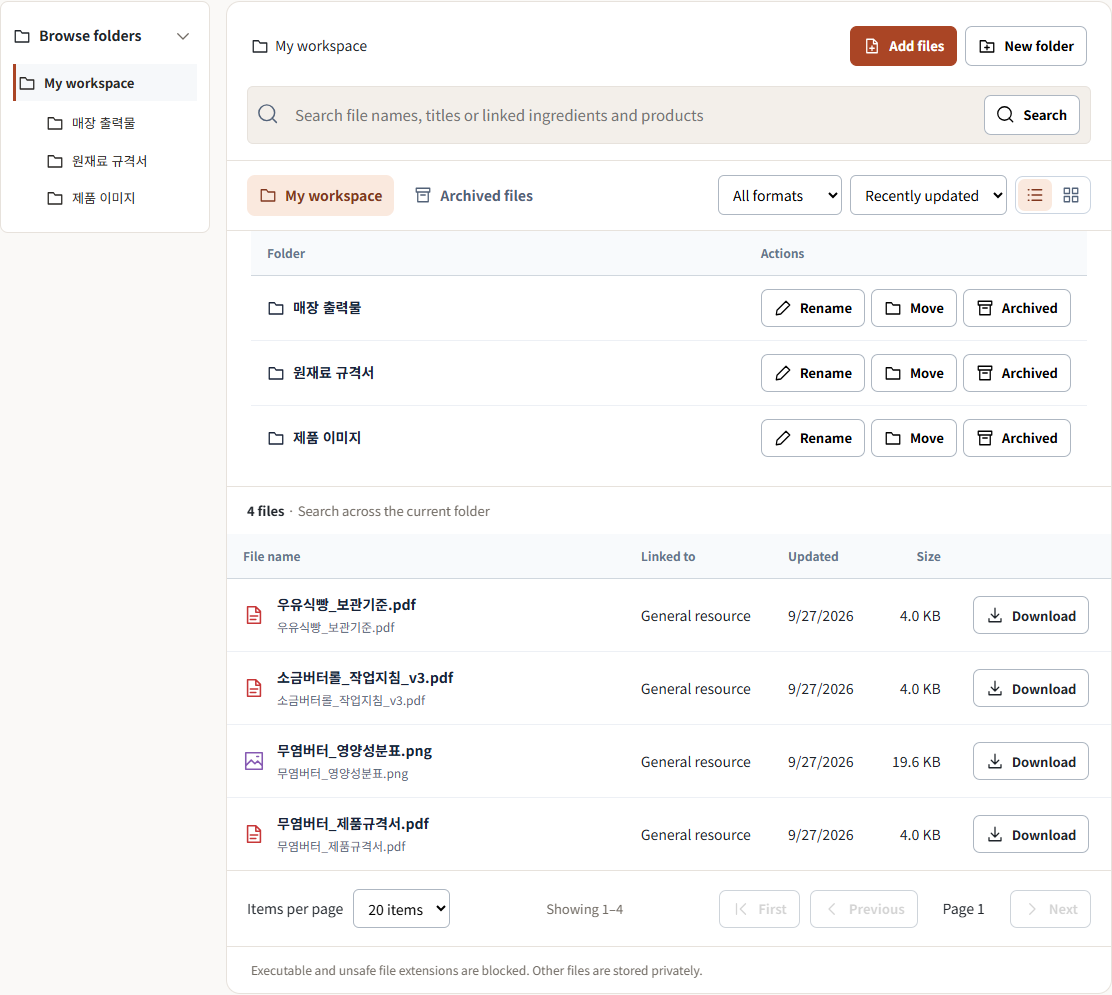
Group ingredient specifications, product images and shop printouts by folder.
Search by file name, title or linked item, then narrow the list by type and sort order.
Open and zoom into the source, then download or print it when needed.
Captured from the actual app with a local demo account. All organizations and files are fictional; buttons within the screenshot are not interactive.
Connect ingredients, recipes and packaging to organize your product’s selling standards.
Access starts after your organization is approved.